


Sat, 17 Jun 2017
Git remote branches and Git's missing terminology
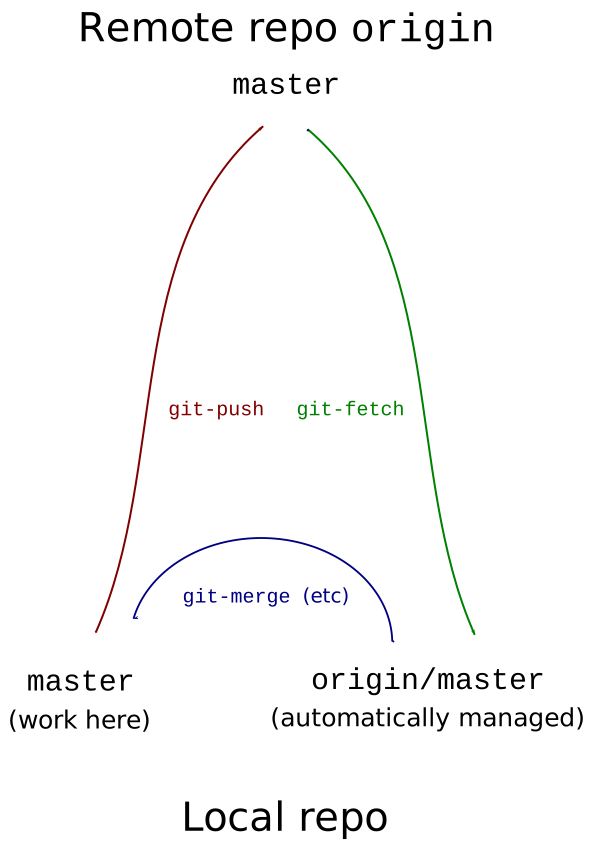
Beginning and even intermediate Git users have several common problem areas, and one of these is the relationship between remote and local branches. I think the basic confusion is that it seems like there ought to be two things, the remote branch and the local one, and you copy back and forth between them. But there are not two but three, and the Git documentation does not clearly point this out or adopt clear terminology to distinguish between the three.
Let's suppose we have a remote repository, which could be called
anything, but is typically named origin. And we have a local
repository which has no name; it's just the local repo.
And let's suppose we're working on a branch named master, as one
often does.
There are not two but three branches of interest, and they might all be pointing to different commits:
The branch named
masterin the local repo. This is where we do our work and make our commits. This is the local branch. It is at the lower left in the diagram.The branch named
masterin the remote repo. This is the remote branch, at the top of the diagram. We cannot normally see this at all because it is (typically) on another computer and (typically) requires a network operation to interact with it. So instead, we mainly deal with…The branch named
origin/masterin the local repo. This is the tracking branch, at the lower right in the diagram.We never modify the tracking branch ourselves. It is automatically maintained for us by Git. Whenever Git communicates with the remote repo and learns something about the disposition of the remote
masterbranch, it updates the local branchorigin/masterto reflect what it has learned.
I think this triangle diagram is the first thing one ought to see when
starting to deal with remote repositories and with git-fetch and
git-push.
The Git documentation often calls the tracking branch the “remote-tracking branch”. It is important to understand that the remote-tracking branch is a local branch in the local repository. It is called the “remote-tracking” branch because it tracks the state of the remote branch, not because it is itself remote. From now on I will just call it the “tracking branch”.
Now let's consider a typical workflow:
We use
git fetch origin master. This copies the remote branchmasterfrom the remote repo to the tracking branchorigin/masterin the local repo. This is the green arrow in the diagram.If other people have added commits to the remote
masterbranch since our last fetch, now is when we find out what they are. We can compare the local branchmasterwith the tracking branchorigin/masterto see what is new. We might usegit log origin/masterto see the new commits, orgit diff origin/masterto compare the new versions of the files with the ones we had before. These commands do not look at the remote branch! They look at the copy of the remote branch that Git retrieved for us. If a long time elapses between the fetch and the compare, the actual remote branch might be in a completely different place than when we fetched at it.(Maybe you use
pullinstead offetch. Butpullis exactly likefetchexcept that it doesmergeorrebaseafter the fetch completes. So the process is the same; it merely combines this step and the next step into one command. )We decide how to combine our local master with
origin/master. We might usegit merge origin/masterto merge the two branches, or we might usegit rebase origin/masterto copy our new local commits onto the commits we just fetched. Or we could usegit reset --hard origin/masterto throw away our local commits (if any) and just take the ones on the tracking branch. There are a lot of things that could happen here, but the blue arrow in the diagram shows the general idea: we see new stuff inorigin/masterand update the localmasterto include that new stuff in some way.After doing some more work on the local
master, we want to publish the new work. We usegit push origin master. This is the red arrow in the diagram. It copies the localmasterto the remotemaster, updating the remotemasterin the process. If it is successful, it also updates the tracking branchorigin/masterto reflect the new position of the remotemaster.
In the last step, why is there no slash in git push origin master?
Because origin/master is the name of the tracking branch, and
the tracking branch is not involved. The push command gets
two arguments: the name of the remote (origin) and the branch to
push (master) and then it copies the local branch to the remote one
of the same name.
Deleting a branch
How do we delete branches? For the local branch, it's easy: git
branch -d master does it instantly.
For the tracking branch, we include the -r flag: git branch
-d -r origin/master. This deletes the tracking branch, and
has no effect whatever on the remote repo. This is a very unusual
thing to do.
To delete the remote branch, we have to use git-push because that
is the only way to affect the remote repo. We use git push origin
:master. As is usual with a push, if this is successful Git also
deletes the tracking branch origin/master.
This section has glossed over an important point: git branch -d
master does not delete the master branch, It only deletes the
ref, which is the name for the branch. The branch itself remains.
If there are other refs that refer to it, it will remain as long as
they do. If there are no other refs that point to it, it will be
deleted in due course, but not immediately. Until the branch is
actually deleted, its contents can be recovered.
Hackery
Another way to delete a local ref (whether tracking or not) is just to
go into the repository and remove it. The repository is usually in a
subdirectory .git of your working tree, and if you cd .git/refs
you can see where Git records the branch names and what they refer to.
The master branch is nothing more nor less than a file heads/master
in this directory, and its contents are the commit ID of the commit to
which it refers. If you edit this commit ID, you have pointed the
ref at a different commit. If you remove the file, the ref is
gone. It is that simple.
Tracking branches are similar. The origin/master ref is
in .git/refs/remotes/origin/master.
The remote master branch, of course, is not in your repository at
all; it's in the remote repository.
Poking around in Git's repository is fun and rewarding. (If it
worries you, make another clone of the repo, poke around in the clone,
and throw it away when you are finished poking.) Tinkering with the
refs is a good place to start Git repo hacking: create a couple of
branches, move them around, examine them, delete them again, all
without using git-branch. Git won't know the difference. Bonus fun
activity: HEAD is defined by the file .git/HEAD. When you make a
new commit, HEAD moves forward. How does that
work?
There is a
gitrepository-layout manual
that says what else you can find in the repository.
Failed pushes
We're now in a good position to understand one of the most common problems that Git beginners face: they have committed some work, and they want to push it to the remote repository, but Git says
      ! [rejected]        master -> master (fetch first)
      error: failed to push some refs to 'remote'
      something something fast-forward, whatever that is
My article explaining this will appear here on Monday. (No, I really mean it.)
Terminology problems
I think one of the reasons this part of Git is so poorly understood is
that there's a lack of good terminology in this area. There needs to
be a way to say "the local branch named master” and “the branch
named master in the remote named origin” without writing a five-
or nine-word phrase every time. The name origin/master looks like
it might be the second of these, but it isn't. The documentation uses
the descriptive but somewhat confusing term “remote-tracking branch”
to refer to it. I think abbreviating this to “tracking branch” would
tend to clear things up more than otherwise.
I haven't though of a good solution to the rest of it yet. It's
tempting to suggest that we should abbreviate “the branch named
master in the remote named origin” to something like
“origin:master” but I think that would be a disaster. It would be
too easy to confuse with origin/master and also with the use of the
colon in the refspec arguments to git-push. Maybe something like
origin -> master that can't possibly be mistaken for part of a shell
command and that looks different enough from origin/master to make
clear that it's related but not the same thing.
Git piles yet another confusion on this:
    $ git checkout master
    Branch master set up to track remote branch master from origin.
This sounds like it has something to with the remote-tracking branch,
but it does not! It means that the local branch master has been
associated with the remote origin so that fetches and pushes that
pertain to it will default to using that remote.
I will think this over and try to come up with something that sucks a little less. Suggestions are welcome.
[Other articles in category /prog] permanent link